


Jobber: Field Service Software
4.41.11K Reviews
App Specs
- Version
- 6.91.0
- Updated On
- License
- Free
- Downloads
- 1,000,000+
- Developer
- Jobber Software
- Categories
- Business
- Platform
- Android, iOS
Screenshots

 Analysis by AppCompare
Running a field service business can mean switching constantly between customer details, job plans, crew coordination, and payment follow-ups. I think Jobber: Field Service Software is most useful when those moving parts need a shared home rather than another isolated tool. It is a business app from Jobber Software, aimed at service work done away from a desk. I would treat it as a way to make everyday operations more consistent, not as a substitute for deciding how the business should run.
Before the app: decide what your workflow needs
Before moving work into a new system, I would map the path a job already takes: how a request becomes a scheduled visit, what the crew needs to know before arriving, and what happens after the work is done. That small exercise makes it easier to tell whether Jobber will reduce friction or simply move the same confusion onto a screen. A scheduling tool cannot settle unclear ownership, for example, if nobody knows who confirms a change with the customer.
Jobber makes the most sense when a business handles recurring field tasks and needs the office and people on the move to stay aligned. It can bring scheduling, client records, invoicing, and operational oversight into one working routine. If your current process relies on messages, paper notes, and separate records, the appeal is less about any single feature and more about having fewer handoffs to manage.
Getting Started with Jobber
First things first, signing up with Jobber is a breeze. The interface welcomes you with a clean design that's both intuitive and easy to navigate. The setup process is straightforward, and you'll find yourself diving into the features without a hitch. Trust me, you don’t need to be a tech genius to get things rolling here.
Capture the details that prevent repeat work
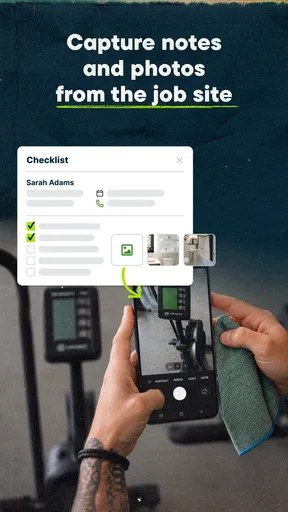
A useful client record is more than a name to search when a customer calls. It is the place where the person coordinating a visit can check the relevant job history and avoid asking the customer to explain the same situation again. I would make a habit of recording clear, practical notes when a job is arranged or completed. The benefit comes from consistent information entry; a system cannot make incomplete notes useful by itself.
There is also a practical trade-off in centralizing information: the more the team depends on a shared record, the more important it becomes to agree on what belongs there. A short note about access or a change to the work can help the next person, while a vague comment can create another call to clarify it. I would keep records focused on what the next person needs to act, rather than treating the client file as a place for unstructured conversation.
Simplifying Scheduling and Dispatching
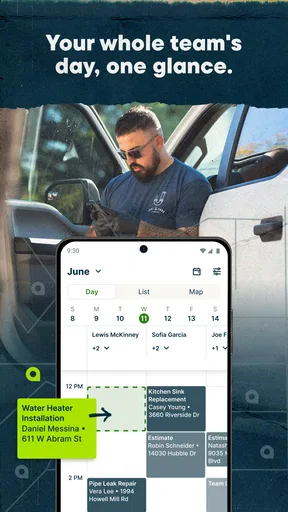
One of the standout features is how smoothly it handles scheduling and dispatching. Picture this: no more back-and-forth calls to coordinate your team. With Jobber, you can easily assign jobs, adjust schedules on the fly, and notify your team right from the app. It's like having a personal assistant that never sleeps.
Worth Reading Before You Choose

EA SPORTS FC Mobile 26 Is a Bigger Football Game, but It Takes Time

Flipboard Shows What News Apps Must Do Beyond the Feed

Switching to Android Auto Means Rethinking Your Driving Routine

Google Calendar Makes a Crowded Week Easier to Manage

Ludo King Makes the Most of the Minutes Between Plans

Baby Panda World Brings Quick Play to Modern Phones, but Its Game Library Feels Busy
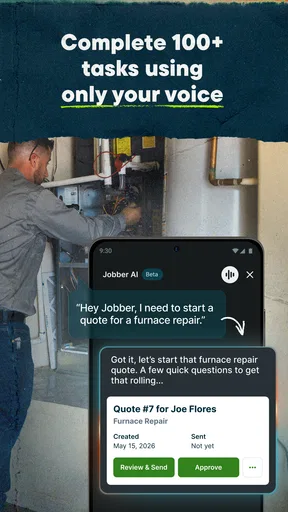
The strongest everyday use is a schedule that changes without turning into a chain of separate conversations. Imagine a customer needs to move a visit while the person coordinating the day is also handling incoming requests. Updating the assignment and alerting the team from the same place can reduce the chance that one person is following an old plan. I would still make a clear habit of checking that a change has reached the people doing the work; a sent update is not the same thing as a shared understanding.
For a small operation, this can be more valuable than a sophisticated planning method. The app supports coordination, but it does not decide which job should take priority when time, distance, or customer expectations conflict. A manager still needs to make that call and set realistic arrival plans. If the business has very unusual routing needs or intricate crew constraints, a specialist scheduling solution may be a better fit than expecting a general field-service workflow to solve every planning problem.
Managing Clients Made Easy
Keeping track of clients can be a headache, but not with Jobber. The client management feature allows you to store all your client information in one place. You can quickly pull up past jobs, invoices, and communications, making it a cinch to provide top-notch service.
This history is especially helpful when the person who answers a follow-up call was not present for the original visit. Instead of relying on someone’s memory, they can look back at the customer’s previous work and relevant communication. That can make a returning customer feel recognized and help the team avoid repeating a basic discovery conversation. It is a modest operational advantage, but it matters when the day is busy.
Build a repeatable routine around the work
For me, the best way to get lasting value from Jobber is to use it at a few dependable checkpoints: when the job is booked, when the schedule changes, after the visit, and when billing needs attention. Those moments create a natural rhythm without requiring staff to document every thought. A simple rule such as “record the change where the job is managed” can prevent details from being stranded in a private text thread.
That routine also helps answer a common concern: does a mobile business need to use the app constantly? Not necessarily. The goal is not to stare at a phone all day, but to capture decisions at the point where they affect someone else. An owner can review the overall work at appropriate times, while field staff focus on the visit and record what the next step requires. The team should agree on which updates are essential so the process remains helpful rather than burdensome.
A useful tip is to separate job completion from payment follow-up in the team’s mental checklist. Finishing the service is one milestone; making sure the administrative work is not forgotten is another. Having job and invoice activity within the same business workflow can make that handoff easier to spot, though it still depends on someone taking responsibility for closing the loop.
Invoicing and Payments Without the Hassle
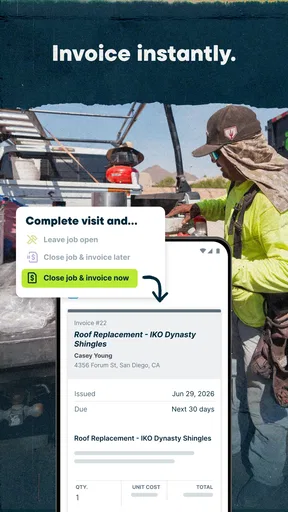
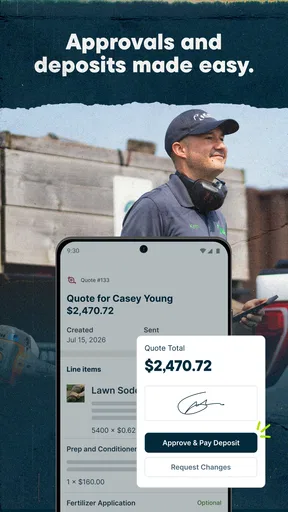
Let's talk about invoicing. Creating and sending invoices can often feel like a chore, but Jobber turns it into a seamless process. You can generate invoices with just a few clicks, and even better, clients can pay online. It's all about getting paid faster without the awkward follow-ups.
For a business owner, the practical question is whether billing happens promptly and consistently, not simply whether an invoice can be created. I would make invoicing part of the closeout routine rather than leaving a pile of finished jobs to process later. Online payment can make it easier for customers to pay without arranging another step, but it does not guarantee payment or remove the need to monitor outstanding work.
Businesses comparing tools should also look carefully at the full cost of the payment and operations setup they actually need. Jobber is free to download, but it offers in-app purchases priced from $9.99 to $399.99 per item. That range makes it sensible to check the current plan and purchase details before building the business around capabilities that may require a paid option. I would compare the likely ongoing spend with the time saved, not judge it by the download price alone.
Tracking Your Team's Time
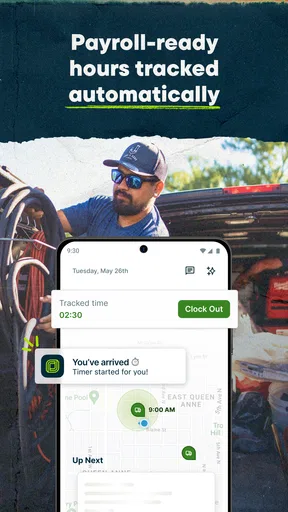
If you've ever had to chase down timesheets, you'll love Jobber's time tracking feature. Your team can log their hours directly in the app, and you can review everything in real-time. It's a fantastic way to ensure accuracy and transparency without the paperwork hassle.
Time records are most useful when the business has a clear reason for collecting them, such as reviewing how long work takes or keeping a more orderly record of hours. I would explain that purpose to staff and set a consistent expectation for entering time. Otherwise, tracking can feel like another administrative demand, and inconsistent entries may be less useful than a simpler process that everyone follows.
Reporting and Insights
Understanding your business performance is crucial, and Jobber doesn't disappoint here. The reporting tools provide insights into your operations, helping you make data-driven decisions. Whether it's tracking revenue, job statuses, or team performance, you'll have all the info you need at your fingertips.
I would use reports to identify questions worth investigating, rather than treating a dashboard as a verdict. If jobs are lingering at the same stage, for instance, the useful next step is to check where the handoff is slowing down. A report can point attention toward a pattern; the owner still needs to understand whether it reflects scheduling, customer decisions, or a team process. That distinction keeps measurement connected to action instead of turning it into another screen to check.
Where the workflow can still break
No app can prevent every operational mistake. A schedule can be updated while a worker is already acting on an earlier plan, and a customer record can be present but too sparse to help. The most important safeguard is a shared team habit for making changes and checking the current job details before setting out. When work moves quickly, relying on memory is the weak point, whether the business uses Jobber or a paper calendar.
There is also a learning and adoption cost. An owner may find the setup approachable, but the whole team still needs to use the same process for the information to stay dependable. If some staff record updates and others keep them in private notes, the central record becomes incomplete. I would introduce the system around a small, clear workflow first, then expand how the team uses it once everyone understands the basic handoffs.
Compared with a paper diary and separate invoicing or contact tools, Jobber’s appeal is having more of the service cycle connected. Compared with a basic calendar, it is more oriented toward the job and customer context rather than simply reserving time. On the other hand, a very small business with occasional jobs may find a calendar and a lightweight invoicing method easier to maintain. A larger operation with specialized dispatch rules may need a more tailored system. The better choice depends on how much coordination the business genuinely has to manage.
Mobile Accessibility
In a world where everything is on-the-go, Jobber's mobile app is a game changer. Whether you're at the job site or grabbing a coffee, you can manage your business operations from anywhere. It's the flexibility that modern businesses need to stay competitive.
That mobile access is most valuable when it lets the person responsible for the next decision act without returning to a desk. An owner between visits can check the work plan, while someone coordinating the office can keep the day moving. I would still avoid turning every spare moment into an admin session: a useful mobile workflow should reduce unnecessary back-and-forth, not encourage people to be permanently on call.
Jobber is a business app rated for Everyone, and it has an average rating of 4.4 from around six thousand ratings, with roughly a thousand written reviews. It has been installed over a million times. Those figures suggest it is an established option that many businesses have tried, but they cannot tell you whether its workflow matches your crew, customer expectations, or billing habits. I would use them as context, then judge the fit against a real week of work.
Customer Support That Cares
Last but not least, let's give a nod to their customer support team. They're friendly, responsive, and genuinely invested in helping you succeed. Whether you have a technical question or need advice on best practices, they're there to assist.
For a first-time user, the most useful questions to resolve early are practical ones: which plan covers the way the business needs to work, what staff should record after a visit, and how invoices fit into the end-of-job routine. Getting those decisions clear before the team relies on the app can prevent a messy transition. The current version is 6.67.0 and requires Android 8.0 or later, details worth checking against the device you intend to use.
Who should make the switch?
I would recommend considering Jobber if you run a home-service operation with recurring coordination between customers, office staff, and people in the field. It is particularly appealing when job history, schedule changes, and billing follow-up are currently scattered across several places. The app is free to install, while optional in-app purchases range from $9.99 to $399.99 per item, so I would review the available costs and match them to the workflow before committing.
I would hesitate if you only handle a handful of simple jobs, already have a reliable system that everyone follows, or need highly specialized dispatch logic. In those cases, a basic calendar, a focused invoicing tool, or a more specialized service platform may be a better fit. Jobber’s value is in bringing everyday service operations together; it is not automatically the best answer for every business size or work style.
Overall, Jobber: Field Service Software is like having a powerful toolkit that keeps your business running smoothly. From scheduling to invoicing, it covers all the bases with ease. If you're in the field service industry and looking to elevate your operations, Jobber is definitely worth checking out. Happy managing!
Pros
- User-friendly interface for quick navigation.
- Integrates well with popular accounting tools.
- Customizable templates for various job types.
- Robust scheduling and dispatch features.
- Strong customer support and resources.
Cons
- Limited offline functionality in remote areas.
- Initial setup can be time-consuming.
- Higher tiers can be pricey for small businesses.
- Mobile app lacks some desktop features.
- Occasional sync issues with calendar apps.
FAQs for Jobber: Field Service Software
What is Jobber: Field Service Software used for?
Jobber is designed to streamline operations for field service businesses. It helps with scheduling, invoicing, client management, and team communication. Whether you're in landscaping, plumbing, or HVAC, Jobber aims to increase efficiency and improve customer satisfaction by organizing all aspects of your business in one place.
Is Jobber compatible with both Android and iOS devices?
Yes, Jobber is available for both Android and iOS. This ensures that you and your team can access it on the go, regardless of your device. The app is designed to offer a seamless experience across platforms, so you can manage your business efficiently from any location.
Does Jobber require an internet connection to work?
While Jobber is best used with an internet connection for real-time updates and cloud syncing, it does offer offline capabilities. You can access certain features and client information without connectivity, and your data will sync automatically once you’re back online, ensuring no disruption in service.
What customer support options are available with Jobber?
Jobber offers robust customer support, including email, phone, and live chat options. There are also extensive online resources such as FAQs, tutorials, and webinars. Their support team is known for being responsive and helpful, ensuring you can resolve issues quickly and keep your business running smoothly.
How secure is my data with Jobber?
Jobber prioritizes data security with industry-standard encryption and regular backups. Your information is stored securely in the cloud, ensuring it is protected against data loss or unauthorized access. Regular updates and security patches help maintain the integrity and confidentiality of your business data.


